Posts like these, made for you in one click
Every post below came out of the same engine you get, each for a sample brand in a different niche, with nothing retouched. Tap any one to see it full size.
48 designed layouts, each one styled with your brand kit. Browse the template gallery
Everything you need, one workspace
Create, schedule, publish, measure and collaborate in one place. 5 of these replace a paid tool outright.
Posts, carousels and graphics in your voice, from one idea or one link.
- Repurpose engineBlog or YouTube link becomes posts that each make a different point.Replaces Repurpose.io
- Carousel maker5-slide IG and LinkedIn decks, Brand Kit on every slide.Instead of Canva
- Video Studio (Lite+)Turn a post, your photos or your words into a vertical video, with captions.
- On-Demand CreditsTop up post drafts or image designs any time, without changing plan.
- Brand Kit auto-fillPaste your URL. Colors, logo and tone, scraped.5 min to 30 sec
- Voice-Match scoreA live "% match to your voice" pill on every draft.On every plan
- Post IdeasAI idea batches you send straight to the composer.
- Post StudioDescribe it once, get a finished post back.
- Campaign Planner (Pro+)Guided 7 or 30-day brand campaigns.
- Content PresetsSave your voice, apply in one click.
- Image Studio48 layouts, Stage composition, click-to-edit.
- Hook Library + Rewriter211 hooks, saved hooks, one-click rewrite.
A calendar that fills itself at the hours your audience is most active.
- The QueueAdd a post without picking a time. It fills your next peak slot.Instead of Buffer
- Content CategoriesSet your content mix. The queue holds it, and flags the drift.Instead of SocialBee
- Evergreen RecyclingRepublish what held up, at a different time of week.
- Drip CampaignsOne URL becomes weeks of posts, spread across your best slots.Instead of Missinglettr
- Bulk CSV ImportBring your whole queue over from your old scheduler in one upload.
- AI Smart SchedulingOne click picks the best moment for this specific post.
- Calendar Sync (Pro+)Your scheduled posts in Google Calendar or Outlook.
- AI Auto-Pilot (Pro+)Schedules every post at the best time.
- Best Time to Post SchedulingPost when engagement actually peaks.
- Smart CalendarSearch, filter, and sort every post.
- Blackout WindowsHours you never publish, enforced automatically.
One click to every network, shaped the way each one wants it.
- Link in First CommentWe move the link out of the body so the post keeps its reach.
- First-Hour Boost (Business+)A stalled post gets a short follow-up in your voice while its reach is still being decided.
- My ContentEvery generated post, searchable in one library.
- Multi-Platform PublishingOne click to all 9 networks.
- Link in BioOne page for every link, with click counts.
- Smart Auto-PublishingSet it and forget it.
- 9 Platform IntegrationsEvery major network, connected.
- Per-Platform ControlYou set the mix per network.
- Media LibraryUpload and attach images anywhere.
Real engagement from every post tunes the next batch.
- Click AttributionWhich POST sent the traffic, not just which link got clicked.
- Hashtag PerformanceWhich of your tags pull weight, and which we cannot judge yet.
- Performance PredictionWhat is costing this draft, before you publish it. Not a score.
- A/B Testing (Pro+)Three versions of a post go out, and real engagement picks the winner.
- Closed-Loop AnalyticsReal engagement tunes the next batch.
- Algorithm-Aware EngineTracks ranking shifts, adapts weekly.
- Competitor Tracking (Pro+)What your niche published that worked.
- AI StrategistAdvice that reads your own numbers first.
- Real-Time AnalyticsDashboards for every platform.
Clients and teammates review, approve and share, without the email chains.
- Analytics ExportA spreadsheet or a printable report you can actually send someone.
- Client ReviewSend a review link. They approve without an account.
- Team Seats + Brand Workspaces (Pro+)Teammates and separate brands, each with its own Brand Kit and connections.
- White-Label Reports (Agency only)Your logo and colors on the report you send, not ours.
- Approval WorkflowApprove before anything publishes.
- Comments InboxThe replies on your posts, in one place.
- Employee Advocacy (Business & Agency)Your team shares from their own accounts.
Built for people who'd rather create than schedule
Pick yours to see how it fits your week.
 CreatorsShow up daily on every platform without losing your week.
 FoundersPosts in your voice while you build and sell.
 Small businessesOn-brand posts, scheduled and published everywhere.
 MarketersKnow which post drove each click, not just which link.
 AgenciesA workspace per client, and approval by link.
 SaaS teamsYour changelog and launches become a week of posts.
 E-commerceProduct drops and reviews become a week of posts.
 CoachesOne client win becomes a week of posts.
An AI that learns from your real engagement
Every post you publish teaches the next one. After 30 days, your content engine is tuned to your audience. Not the internet's.
- Step 1 · You publishDrifter posts in your voice to all 9 platforms, on your schedule.
- Step 2 · We measureEvery post’s real engagement is pulled automatically, every 30 minutes.
- Step 3 · AI adaptsThe next batch is tuned to what actually worked for your audience.
From idea to published post in under 2 minutes
Three steps, one tool, no switching. These are real screens from the dashboard.
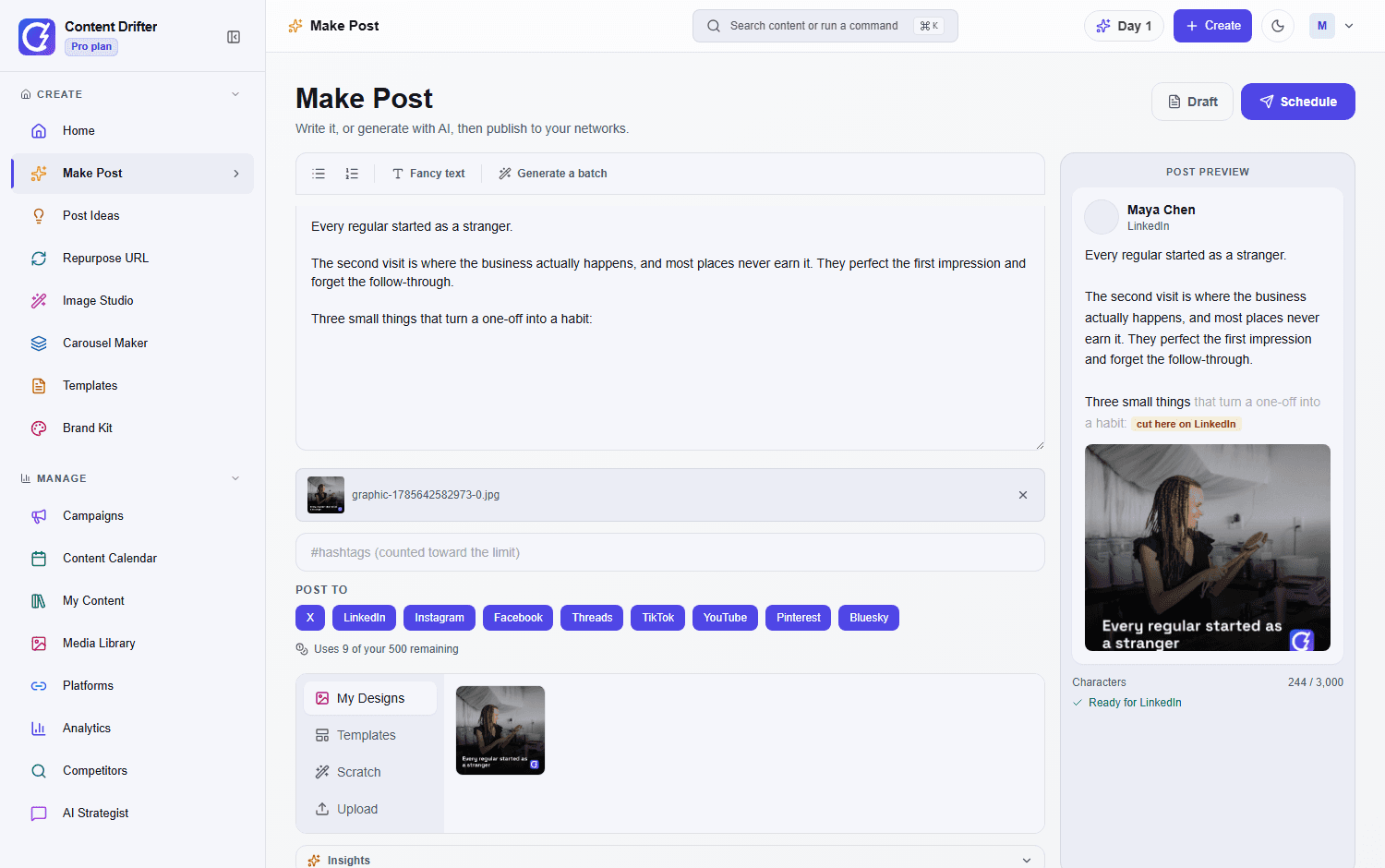
- 1Step 1 · Write
Describe it. The AI drafts it in your voice.
- Post Studio: say what the post is about, get a finished draft
- Post Ideas serves idea batches tuned to your niche
- Voice-Match learns from what you have already published
- Live per-network preview and character count as you type
- 2Step 2 · Design
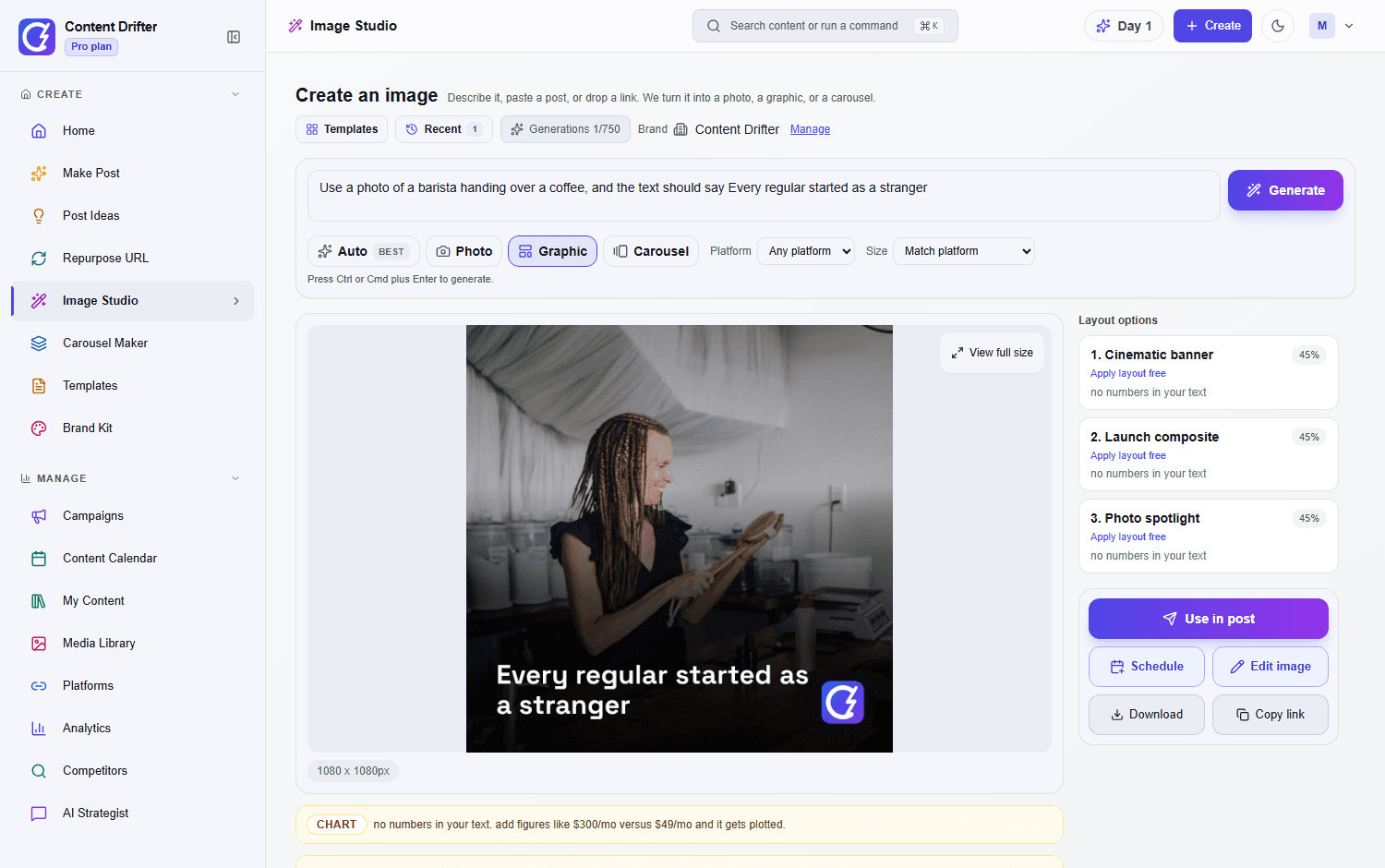
Add the visual without opening Canva.
- 1059 templates for carousels, quotes, stats and announcements
- Your Brand Kit colors, fonts and logo applied automatically
- Pick a layout or let Auto read your text and choose one
- Every generation stays editable on a click-to-edit canvas
- 3Step 3 · Publish
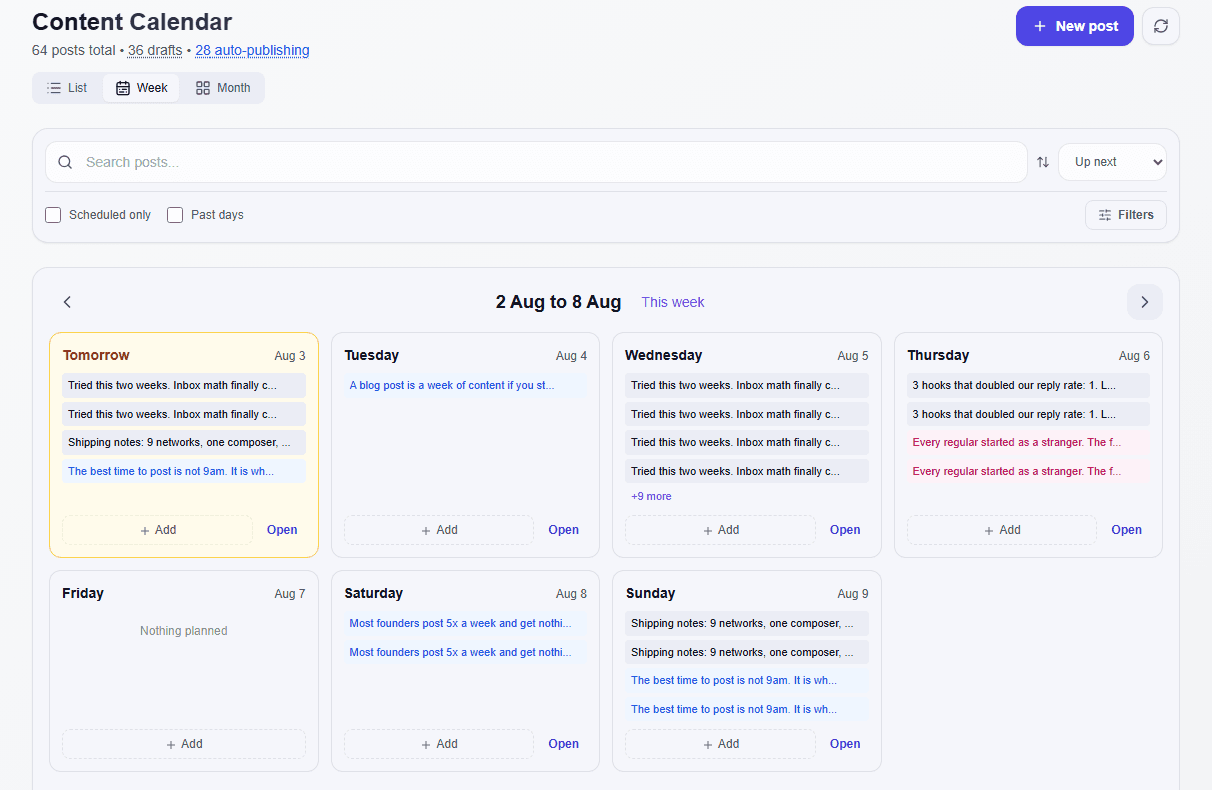
Schedule once. It posts everywhere, hands-free.
- One composer for all 9 networks. TikTok and YouTube take video, which starts on Lite.
- Best-time scheduling places each post when your audience actually shows up
- Auto-publishing ships it without you opening the app
- Final review holds anything you want to approve first
Calculate How Much You'll Save
Drag the sliders to match your workflow. Watch the savings add up in real time.
Your Current Workflow
$1,728
per month
11.5h
per week
$1,409
saved/month
598h
(75 full work days)
Monthly Cost Breakdown
See the full side-by-side comparison
Side-by-Side: How It Stacks Up
Monthly Cost
Your Time Each Week
Content Quality
Smart Scheduling
Scales With You
DIY (You)
Hired Manager
Content Drifter
Monthly Cost
$0 (your time isn't free)
$1,500 to $3,000/mo freelance, $5,500+ in-house
From $0/mo
Your Time Each Week
Every post, by hand
Briefing and reviewing their work
About 30 minutes for 10 posts
Content Quality
Inconsistent
Depends on who you hire
AI-optimized, brand-consistent
Smart Scheduling
Guesswork
Basic analytics
AI picks the best time to post
Scales With You
No, a day only has 24 hours
Yes, but so does the bill
Up to 1000 posts a month, no new hire
Proof, not promises
Every claim here links to the page where you can check it.
- 9networks, all published to from one workspaceSee every network
- 42free tools you can use right now, with no accountTry one
- 47product updates shipped since Sep 15Latest, Oct 15: Turn any photo in My Content into a productRead the changelog
Your accounts stay safe
- Each network connects through its own secure login (an app password for Bluesky). Your account password never reaches us.
- Minimum permissions per network. We never read or send your DMs.
- A post a network would refuse is held for you to fix, never forced through.
Your content stays yours
- Never used to train a shared model. Your engagement only tunes your own account.
- Encrypted in transit and at rest, access tokens included.
- Delete your account yourself, whenever you want, from your settings.
Trying it costs you nothing
- 3 days free when you sign up. No card, so nothing bills when it ends.
- A Free plan with 8 post drafts a month and no end date.
- 7-day money-back guarantee (Lite and Starter plans). Cancel anytime and keep everything you made.
Content Drifter is built and operated by Mtaclabs LLC. Payments are handled by Stripe, our merchant of record.System statusContact us
The Algorithm Rewards Consistency. AI Gives You an Unfair Advantage.
Stop guessing and start growing. Your first 8 post drafts are free, no credit card required.
Frequently asked questions
What is Content Drifter?
Content Drifter is an all-in-one AI social media platform: AI-assisted content generation, image design, carousels, content calendar, best time to post scheduling, Auto-Pilot, Campaign Planner, and auto-publishing to Instagram, TikTok, X, Facebook, LinkedIn, Threads, YouTube, Pinterest, and Bluesky, with closed-loop analytics. Built for creators, marketers, founders, and growing teams.
Which social platforms does Content Drifter support?
Content Drifter publishes to 9 platforms: Instagram, TikTok, X (Twitter), Facebook, LinkedIn, Threads, YouTube, Pinterest, and Bluesky. Every plan connects all 9 of them, including the free forever plan. Free publishes to 7 of 9 networks; TikTok and YouTube take video, which starts on Lite. Paid plans add volume and video, so TikTok and YouTube publish too.
Does Content Drifter have a free plan?
Yes. The Free plan includes 8 post drafts per month, 8 image designs, 10 publishes, best time to post scheduling, and all 9 connected platforms. No credit card required.
How is Content Drifter different from Buffer or Hootsuite?
Buffer and Hootsuite are schedulers: you still write every post. Content Drifter generates posts in your voice, runs an algorithm-aware engine, and feeds real engagement back into the next batch. It includes image creation with AI help, carousels, and Campaign Planner that pure schedulers do not ship.
I already use ChatGPT. Why do I need Content Drifter?
Keep using ChatGPT for brainstorming. Content Drifter runs the rest of the workflow: it learns your brand voice once, generates a batch of posts sized to each platform, designs carousels and images with AI help, schedules everything at your best-performing times, auto-publishes across all 9 networks, and feeds real engagement back into the next batch. ChatGPT hands you a blank box and a copy button; Content Drifter runs the whole pipeline on autopilot.
What is closed-loop analytics in Content Drifter?
Every published post is tracked for likes, comments, shares, reach, and engagement rate. Your top 3 and bottom 2 posts from the last 30 days are injected into the next generation prompt so month two outperforms month one. Included on every paid plan (Lite and up).
Can Content Drifter replace my social media manager?
It replaces the production half of the job, not the judgement half. That production layer is writing posts in your voice, designing branded carousels, scheduling at peak windows, auto-publishing to all 9 networks, and reporting on what worked. It does not replace original photo and video shoots, influencer relationships, paid-media buying, or crisis communications. The honest comparison, including what you give up, is on the AI vs hiring a social media manager page.
What are the best posting times?
Your best posting times are the peak windows on each platform, drawn from published engagement research and then re-ranked against your own results as you publish. Content Drifter schedules your content into them automatically. Free on every plan.
Who is Content Drifter for?
Solo founders running content alongside a product, creators who want to grow without hiring a manager, small businesses who cannot justify an agency retainer, and small agencies that want more output per account manager. Persona pages live at /for-creators, /for-small-business and /for-marketers.
How does the algorithm-aware engine work?
Content Drifter maintains a live profile of how each platform currently rewards content: format weights, length sweet spots, link rules and engagement signals. The engine injects that profile into every generation, picks the strongest format for your account using Bayesian shrinkage over your own engagement history, and re-ranks your posting times against your best-performing hours. A daily canary watches for aggregate shifts so posts adapt before the news cycle does.
Is Content Drifter just a content generator, or a full marketing tool?
It is a full social media marketing tool. Content generation is one of the seven things it ships: AI-assisted drafting, branded carousel design, multi-platform scheduling, auto-publishing, repurposing engine, Campaign Planner, and closed-loop post analytics. It also threads marketing copywriting frameworks (PAS, AIDA, BAB, FAB, PASTOR) into every campaign post, so the body and CTA arc actually converts rather than just reading well.
What does a $1,500/mo social media manager deliver versus $15/mo of Content Drifter?
At $1,500/mo a social media manager typically delivers 8 to 12 posts, basic scheduling, and a monthly metrics deck. At $15/mo Content Drifter delivers up to 60 generated posts, automatic best time to post scheduling, branded carousels (Lite and up), repurposing of any blog or YouTube link into posts that each make a different point (Lite and up), and closed-loop analytics on every paid plan. The pricing page has the full feature comparison and an interactive ROI calculator.
How does AI-assisted content generation work in Content Drifter?
Content Drifter uses content presets that learn your brand voice, target audience, and platform best practices, so the AI can draft posts, captions, and hashtags for every platform in seconds. Campaign Planner gets an extra layer: each post is structured by a copywriting framework (PAS, AIDA, BAB, FAB, PASTOR, STAR, or 4Ps) chosen from the slot's intent, so awareness posts read differently from conversion posts.
Is Content Drifter a social media scheduler?
Yes, and more than a scheduler. Every plan includes a content calendar, best time to post recommendations, multi-platform publishing, and auto-publishing at the times you schedule, inside each plan's monthly allowance. AI Smart Scheduling is on Lite and up; Auto-Pilot, which can schedule and publish a full week of posts hands-free while respecting blackout windows, is on Pro and up.
Can Content Drifter create images and carousels with AI help?
Yes. The Image Studio is included on every plan: photos made with AI help, 48 designed layout families with Stage composition (photo, copy, chart, icons, and your logo together), every rendered text layer editable, deterministic drag/resize/deselect, output-pixel typography, draggable and zoomable photo crops, clean preview first, responsive local drafts with one explicit Save, and free deterministic re-renders, all against one monthly generation quota per tier. Free picks from 2 of those layout families and 1 of the 5 design presets; paid plans get every one. Brand Kit auto-fill from your website URL is included on every plan, Free included, and the carousel maker for ready-to-publish 5-slide Instagram and LinkedIn decks on Lite and up.
Can I use Content Drifter as an Instagram post maker?
Yes. Pick an Instagram post template from the gallery or describe the post, and the image generator renders it at Instagram's 4:5 feed, 1:1 square or 9:16 story size with your Brand Kit applied. Every text layer stays editable and re-renders are free. LinkedIn, Facebook, X, TikTok and Pinterest sizes render the same way.
How does Content Drifter compare to hiring a social media agency?
An agency adds strategy, cross-account pattern matching, and production capacity you cannot automate yet. Content Drifter covers the recurring content, scheduling, publishing and reporting layer that agencies bill by the hour, starting at $15/mo. Many teams run both: the agency sets direction, Content Drifter produces the volume. The full side-by-side is on the AI vs hiring an agency page.
Still weighing it up
Read the honest side-by-side
Every comparison names what the other tool does better. Pick the one you are actually deciding between.
Against another tool
Feature-by-feature, with their current pricing and the month we last checked it.
All 28 comparisonsAgainst hiring someone
What a manager or an agency actually costs, and the parts of the job software cannot do.
Or skip the comparison
Browse the templates and post something today. Free, no account needed to look.